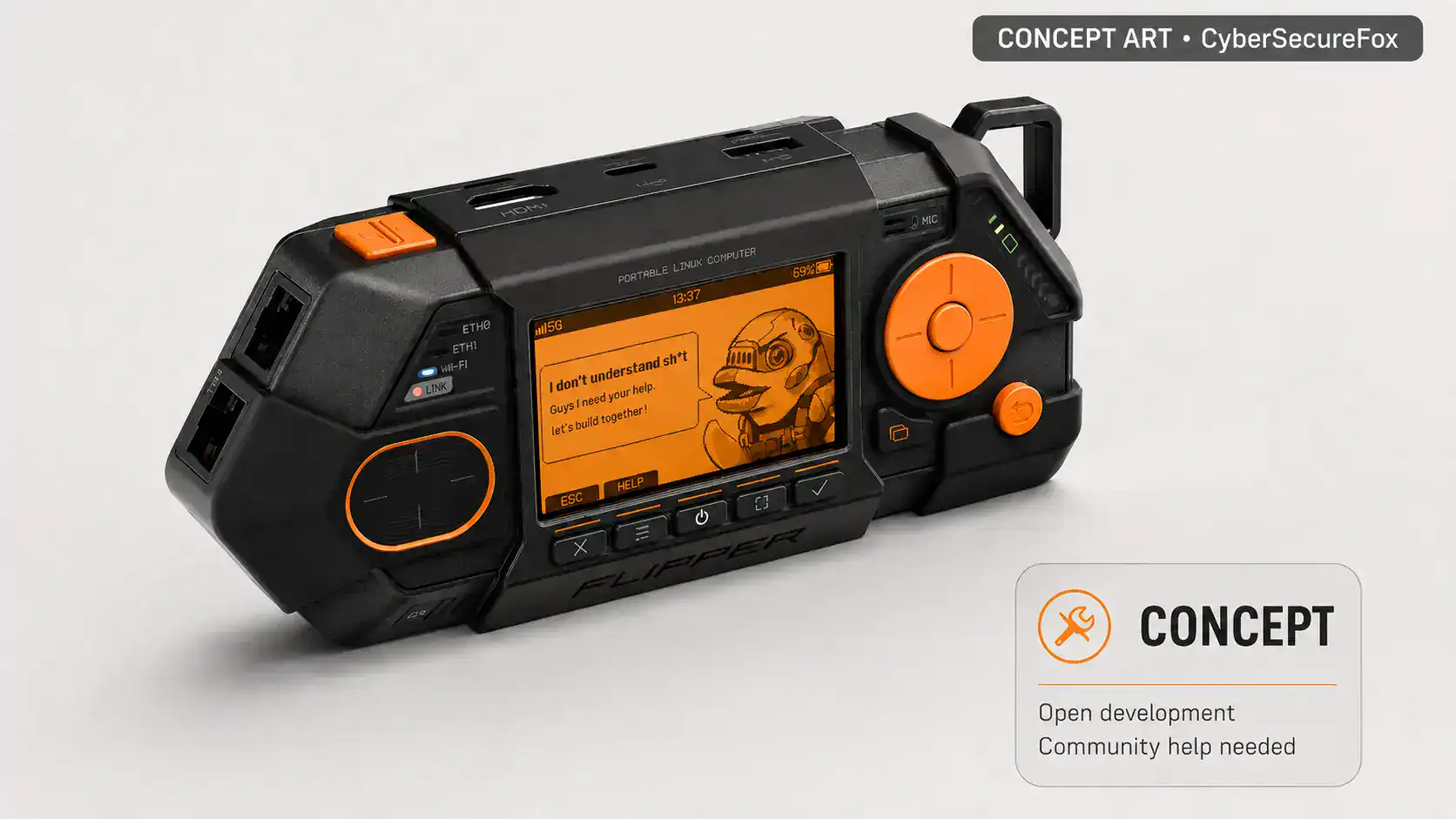
Flipper One is not a finished product or a conventional product announcement. It is an open concept for a portable Linux platform designed for network analysis, penetration testing, and engineering tasks — and in May 2026, Flipper Devices brought the entire development process into the open with a direct call for community help. The device is built around the Rockchip RK3576 SoC with mainline Linux support, features multiple independent network uplinks, an M.2 expansion port, and runs on a dual-processor architecture. For security professionals, what matters here is not just the future tool itself, but the process: a hardware manufacturer is exposing an unfinished architecture, technical risks, and specific areas where engineers can shape the final product.
Context: from Flipper Zero to Flipper One
Understanding the scope of Flipper One requires context. Flipper Devices, co-founded by Pavel Zhovner, launched on Kickstarter in 2020 with Flipper Zero — a pocket-sized multitool for working with radio protocols, NFC, RFID, infrared signals, and low-level hardware interfaces. The campaign raised nearly $5 million, and in the original Flipper One announcement the team mentions roughly one million Flipper Zero units in users’ hands. These numbers matter not as a boast, but as an explanation of why Flipper has an active community it can now turn to with a far more complex project. An international community formed around the device, producing third-party firmware, expansion modules, and educational content — alongside a wave of media hype and myths: in 2024, the Canadian government announced its intention to restrict devices like Flipper Zero over car theft concerns, though Flipper’s response demonstrated those claims were unfounded. Flipper Zero proved there is real demand for open security research tools when they ship with an accessible interface and transparent development. Flipper One is an attempt to carry that approach to a different level: from offline protocols to IP networks and full Linux.
Why this is not a typical product announcement
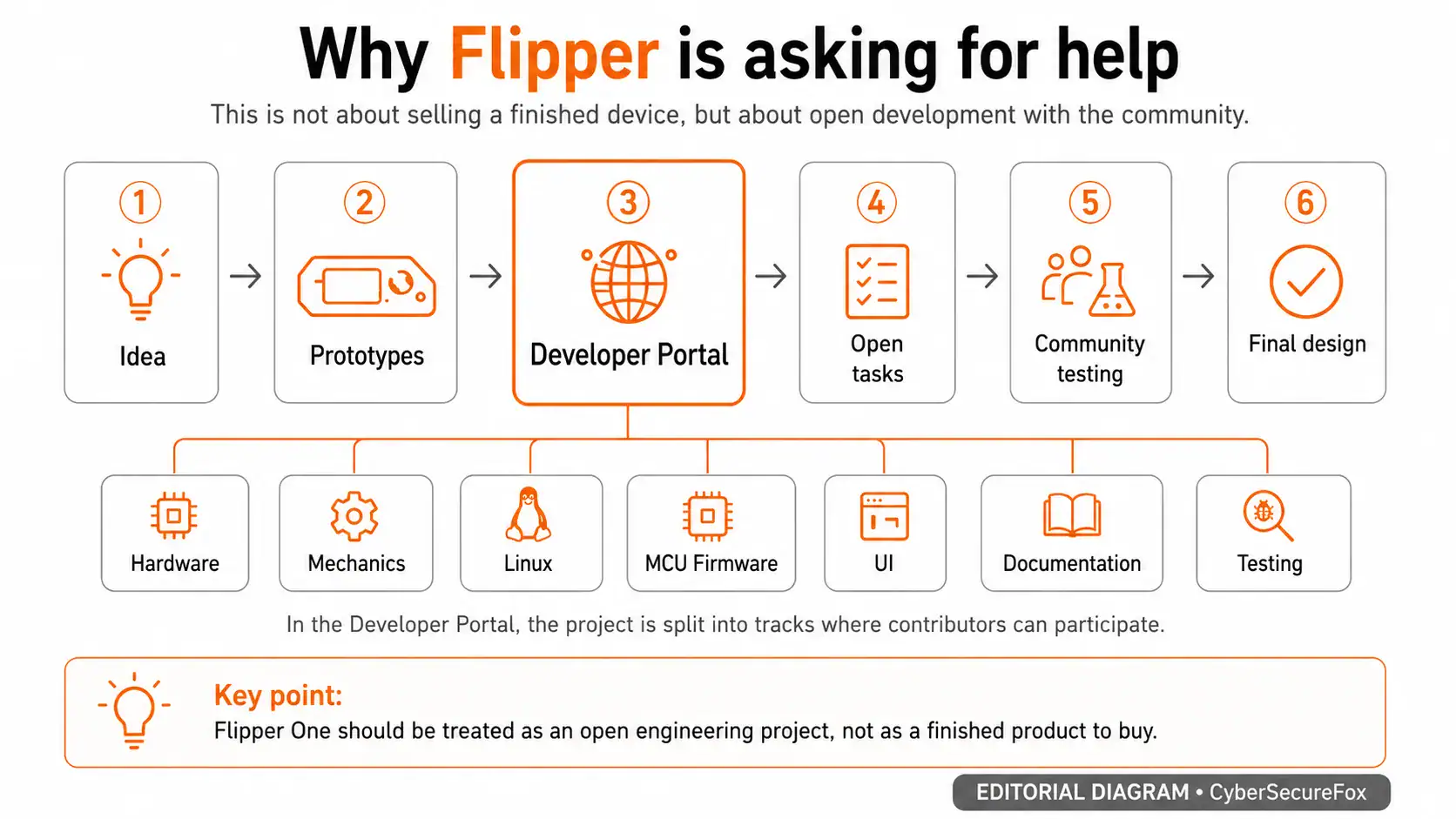
The original post Flipper One — we need your help opens with: “Honestly? We’re genuinely terrified, and we need your help.” The team states plainly that the project has been restarted from scratch multiple times, remains technically and financially challenging, and many goals carry significant uncertainty. There is no price, no release date, no pre-order button. Instead, Flipper opened a Developer Portal with task trackers, architecture discussions, draft documentation, and a list of areas where help is needed. This is a rare case of a hardware project showing not just polished renders, but the messy reality of engineering work in progress.
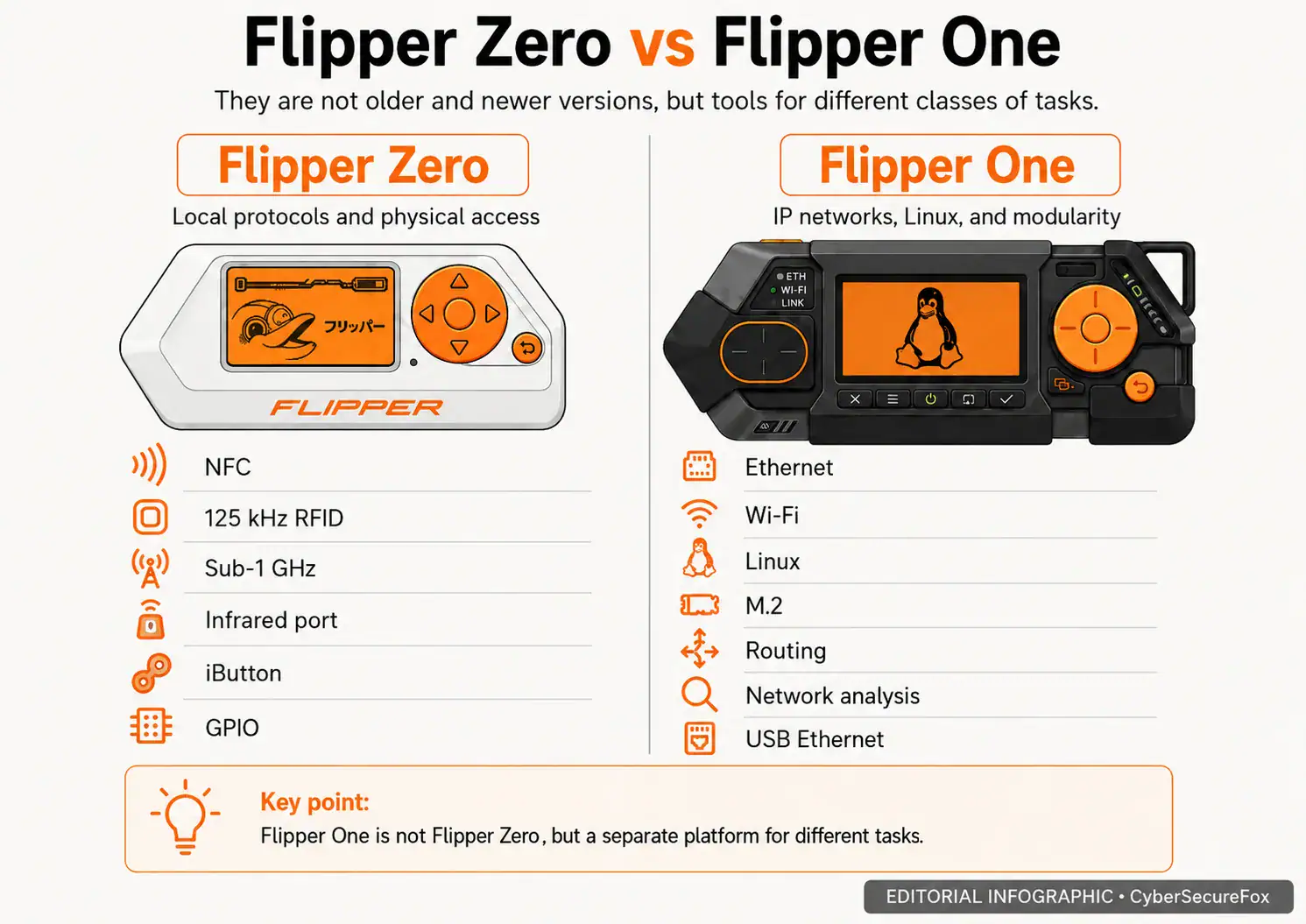
Before diving into the technical details, one widespread misconception needs clearing up: Flipper One does not replace Flipper Zero. Flipper Devices frames the split in terms of the OSI model. Flipper Zero operates at the level of offline protocols and physical access: NFC, 125 kHz RFID, Sub-1 GHz, infrared, iButton, UART, SPI, I²C. Flipper One shifts focus to IP networking: Ethernet, Wi-Fi, 5G, satellite connectivity, routing, and high-performance computing on Linux. It is not a “pro version” — it is a different class of device solving different problems.
Legal framework. Every scenario discussed in this article — Wi-Fi monitoring, traffic capture, transparent Ethernet bridging, running network utilities — involves dual-use tools. Use them only in your own lab, on infrastructure you own, or under written authorization from the client. Unauthorized access to computer systems carries serious penalties in most jurisdictions, including 18 U.S. Code § 1030 and the Computer Misuse Act 1990. For formal penetration test planning, NIST SP 800-115 provides a useful reference.
Dual-processor architecture: why a separate microcontroller matters
The defining architectural decision in Flipper One is its dual-processor design, and it directly shapes the user experience. The main compute is handled by the eight-core Rockchip RK3576 SoC with a Mali-G52 GPU, an onboard NPU for local machine learning models, and 8 GB of RAM. Running alongside it is a Raspberry Pi RP2350 microcontroller with two cores, responsible for the display (256×144 pixels, grayscale), buttons, trackpad, LEDs, power management, and boot sequencing. The full current prototype specification also lists 64 GB of UFS internal storage, a microSD slot, two USB-C ports, USB-A, full-size HDMI 2.1, and a Nano SIM slot.
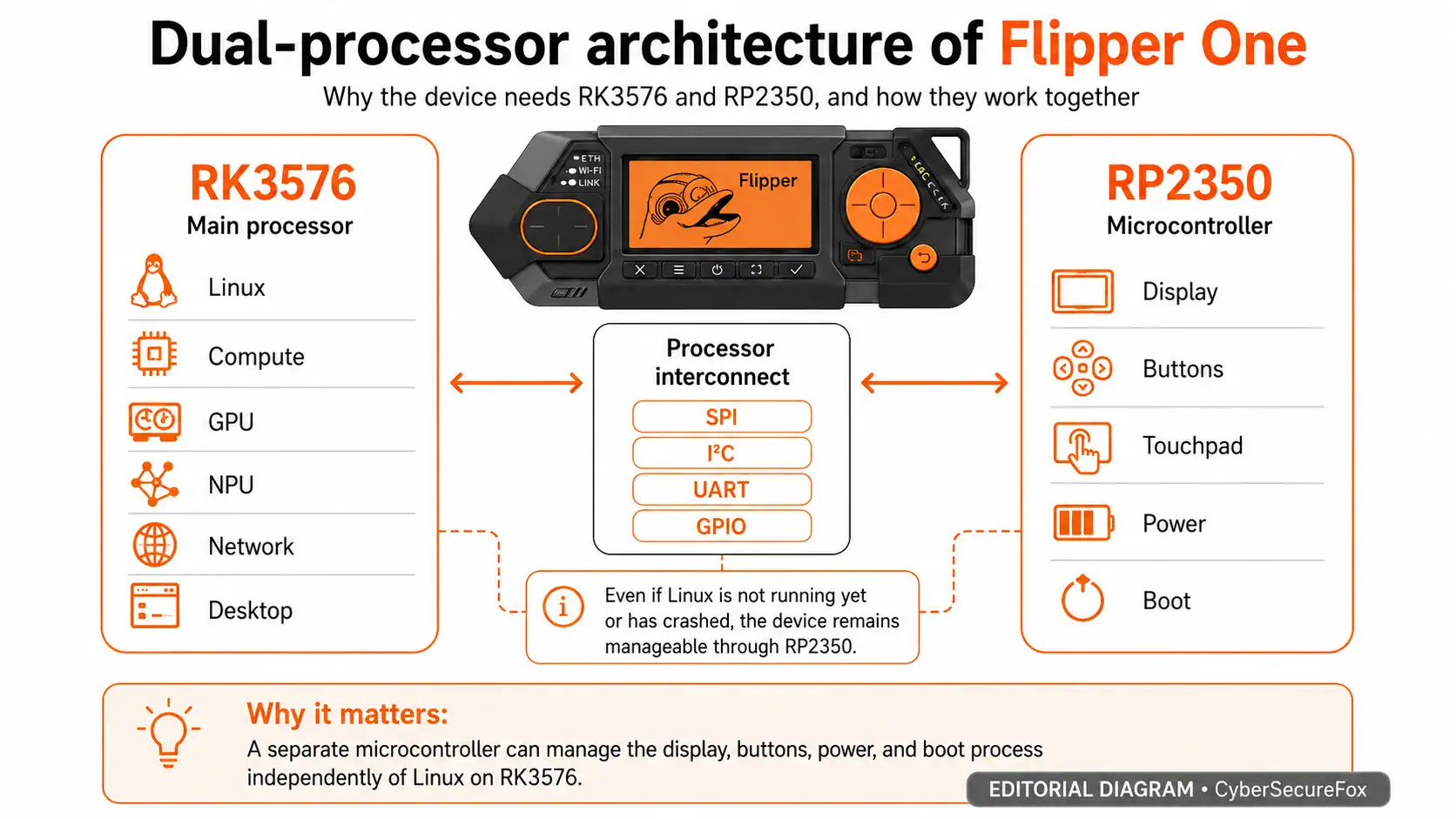
This architecture addresses a fundamental problem with single-board computers: when Linux is not running or has crashed, the device is a brick. On Flipper One, the microcontroller operates independently of the main processor. You can see device status on the screen, configure boot parameters, and switch profiles even when Linux has not started, has frozen, or has been deliberately powered off to save energy. For fieldwork, this is critical — the device remains controllable in any state.
The two processors communicate through a set of interfaces the documentation calls Interconnect. SPI sends the framebuffer to the display via the MCU, I²C carries commands to the microcontroller and button/trackpad events back to the CPU, and UART plus GPIO lines manage the CPU boot process. The team plans to upstream the display and input drivers into mainline Linux without out-of-tree modules and is asking the kernel community to review the design and help implement proper support.
The tradeoff deserves acknowledgment. A dual-processor design adds a layer of complexity. If the MCU firmware has a bug or the Interconnect behaves unstably, diagnosing the issue becomes non-trivial — you need to look not just at Linux, but also at the controller firmware and the communication protocol between them. This is not an argument against the architecture, but a reason to pay close attention to the maturity of the MCU firmware, which is already published as open source.
Mainline Linux and the Collabora partnership: the core of the whole idea
The most ambitious claim Flipper One makes is not about the screen or the port layout — it is the attempt to build an ARM device with full mainline Linux kernel support. In the embedded world, this is the exception, not the rule. The vast majority of ARM boards ship with a BSP kernel — a vendor fork of Linux frozen at some version and layered with proprietary drivers and out-of-tree patches. Within a couple of years, this turns into technical debt: security updates lag, kernel APIs are unstable, and vendor lock-in is total.
Flipper Devices is working with Collabora, an engineering firm that specializes in upstream Linux development for hardware platforms. The shared goal is full RK3576 support in the mainline kernel, so a user can download a kernel directly from kernel.org, compile it, and boot Flipper One without a single vendor patch. According to Collabora, initial RK3576 support landed in Linux 6.12 back in December 2024, covering clocking, power management, storage, networking, I2C, SPI, pin muxing, and GPU. External reviews have shown prototypes running Debian with KDE Plasma, but what matters for this article is not the specific desktop environment — it is the commitment to mainline kernel support.
This is also where the biggest open questions lie. The early boot chain still contains a binary DDR trainer — a proprietary blob from Rockchip that initializes RAM. Work on power management and USB-C DisplayPort Alt Mode continues. NPU and hardware video decoding (H.264/HEVC) are not yet supported in the mainline kernel — the team explicitly states these features may arrive after the device ships. Current status for each component is tracked on the RK3576 mainline support page and in the Collabora repository.
For security professionals, mainline support is not abstract idealism — it delivers concrete benefits: timely security updates, compatibility with tools like eBPF, predictable kernel API behavior, and the ability to verify exactly what code runs on the device. But as long as the DDR trainer remains closed, calling the platform fully open is not accurate. The team is directly asking the community to help — including pushing Rockchip to open-source that last blob.
Network uplinks: what is planned and what scenarios they enable
Flipper One is designed as a network multitool. The current concept includes five independent network uplinks: two Gigabit Ethernet ports, Wi-Fi 6E, USB-C Ethernet, and a cellular modem via M.2. Satellite connectivity via NTN is described separately as a direction for which the team is seeking a partner and a suitable module. The use case documentation frames these capabilities through concrete user tasks:
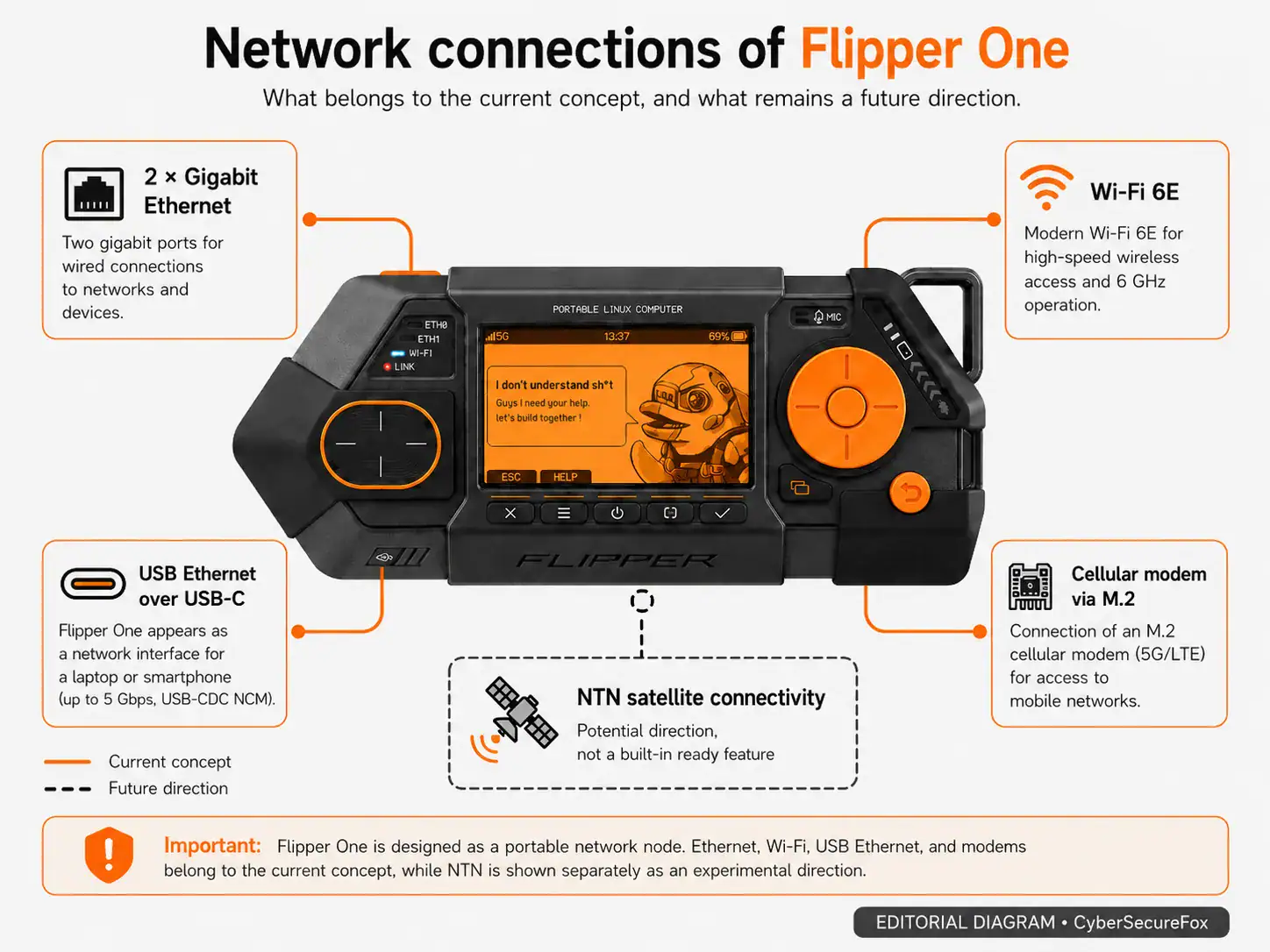
- 2× Gigabit Ethernet — two independent WAN/LAN ports at 1 Gbps. The primary pentest scenario: a transparent bridge for inline traffic capture without changing the network’s IP addressing. On a Raspberry Pi, this requires a USB Ethernet adapter that often proves unstable under load.
- Wi-Fi 6E — MediaTek MT7921AUN chipset, tri-band (2.4/5/6 GHz), with an open driver in mainline Linux. The same chipset found in the popular Alfa AWUS036AXML adapter. The team is testing the MT7921AUN: monitor mode is declared, packet injection is among the scenarios being validated, and the final Wi-Fi chipset choice remains open.
- USB Ethernet — up to 5 Gbps via USB-C. Connect a laptop or smartphone with a cable and get an additional network interface with no driver installation required (USB-CDC NCM).
- Cellular modem — 5G or LTE via an M.2 module with external antenna support, physical Nano SIM, and eSIM.
- NTN satellite connectivity (experimental) — a low-bandwidth channel using the 3GPP Non-Terrestrial Networks standard. The same technology used for emergency SOS messaging on modern smartphones. The team is looking for an integration partner.
For a practitioner, what matters is not the length of the port list but the ability to assemble a repeatable field scenario. Place the device between a camera and a switch, capture pcap, inspect DNS queries — all without changing the network topology. Or use Flipper One as a temporary VPN gateway: wired connection to a corporate network on one port, egress through a 5G modem on the other, all traffic tunneled. But all of this only delivers value with stable drivers, proper logging, clear artifact export, and predictable system state recovery. That is precisely why the team is testing these scenarios before locking in the design.
Wi-Fi: why the team is asking for testing help
The Wi-Fi situation deserves separate attention. Flipper Devices selected MediaTek MT7921AUN as the primary candidate but states plainly: the decision is not final. The Network testing page lists specific test scenarios: access point operation across bands, simultaneous client and AP mode, monitor mode, traffic capture, and packet injection. The team invites anyone working in wireless security auditing to validate the chipset under real-world conditions and help determine whether it is the right choice or whether an alternative should be explored.
This is the right time to get involved. Wi-Fi compatibility cannot be evaluated by chipset name or driver availability alone. For a field tool, what matters is stability under load, behavior after sleep and wake cycles, interoperability with different access points, integrated antenna quality, thermal behavior in a closed enclosure, and test reproducibility. If the team locks in the chipset before real-world validation data is collected, the device risks ending up with a clean spec sheet and frustrating real-world limitations.
Modularity: M.2 and GPIO expansion
Expandability is central to the platform concept. The M.2 port (Key-B, sizes 2242/3042/3052) exposes PCI Express 2.1 ×1, USB 3.1, USB 2.0, SATA3, serial audio, UART, I2C, and a SIM card line. This supports NVMe drives, SDR modules, cellular and satellite modems, AI accelerators, and Wi-Fi cards via adapters. The M.2 module installs inside the enclosure, under the rear panel, which can be swapped depending on module type.
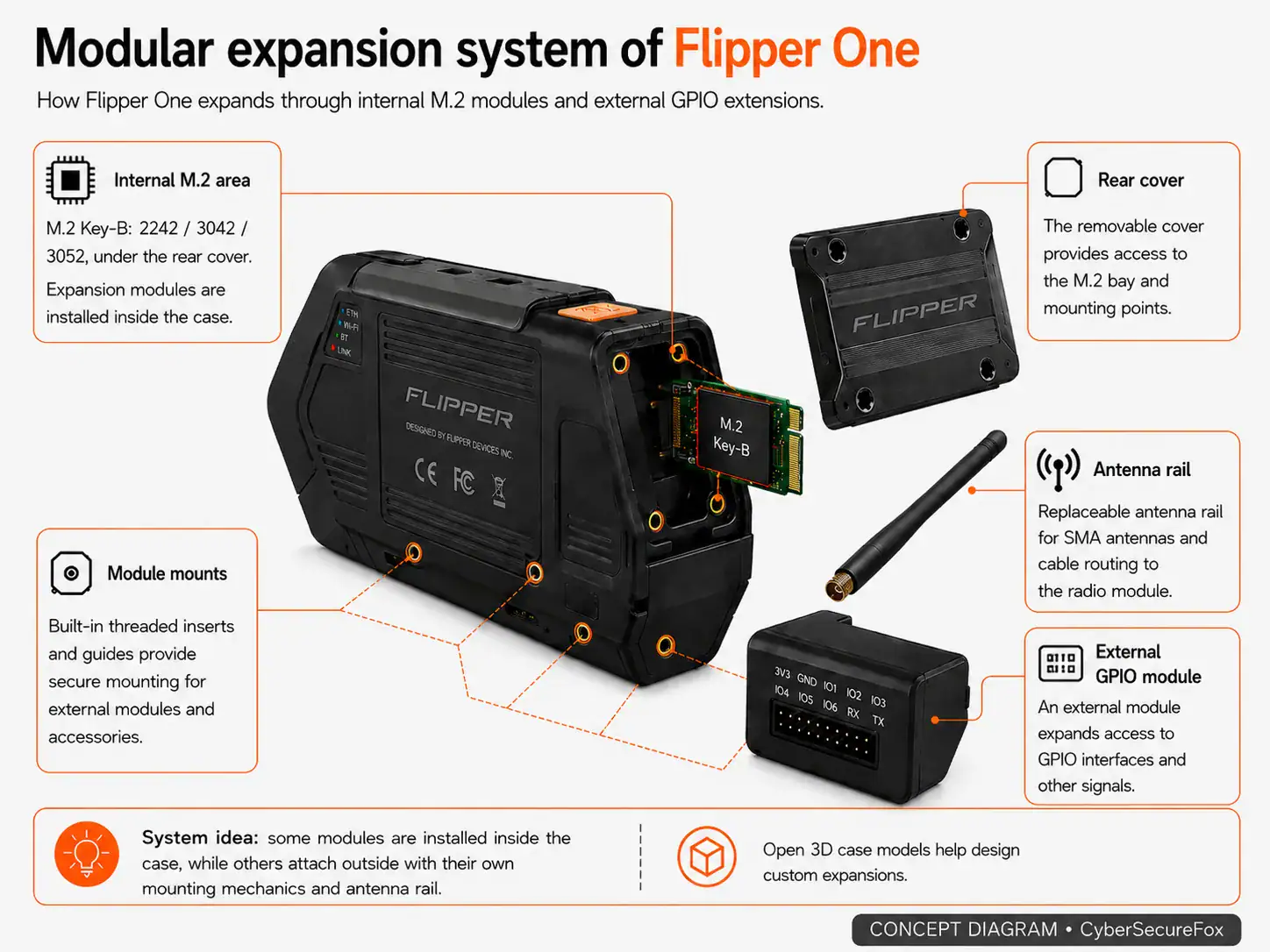
For simpler custom builds, a GPIO header with standard 2.54 mm pitch is provided. The rear panel has threaded inserts at the same pitch as standard perfboard holes — you can cut a piece of perfboard to size, solder your module, and screw it onto the device. The GPIO module examples already show a radio transceiver and a camera module.
Flipper Devices publishes 3D models of enclosure parts (main body, rear panel, antenna rail) for designing custom modules. However, M.2 is not a guarantee that “any module will work.” The form factor does not ensure compatibility in terms of power, thermal dissipation, interface, firmware, or drivers. Every officially supported module will need separate validation: power draw under load, thermal behavior inside the enclosure, stability after reboots, mainline driver status. The team is seeking feedback from the community and module vendors on the port specification.
Flipper OS and FlipCTL: the right problem, an unfinished solution
One of the concept’s strongest aspects is its attempt to solve a real pain point for portable Linux users. Pavel Zhovner, founder of Flipper Devices, describes a familiar scenario: a Raspberry Pi works as a router today, a media box tomorrow, a logic analyzer the day after. After several rounds of reconfiguration, the system becomes an unmanageable tangle of packages and hand-edited configs, and rolling back to a clean state means re-flashing the SD card.
Flipper OS is a layer on top of Debian that introduces profiles: full system snapshots with different pre-installed packages and configurations. Load a “network sniffer” profile, do your work, switch to a “router” profile. Break the current profile — revert to a clean copy. For security teams, environment reproducibility is often more valuable than the number of installed tools. But the team openly acknowledges: “Flipper OS is an extremely hard project, and we’re not 100% sure how to architect it yet.” The architecture is not finalized, prototypes are in progress, and feedback from people who have built similar systems is especially welcome.
FlipCTL tackles a different pain point: Linux utilities are poorly suited for small screens and button-based navigation. The idea is to wrap ping, traceroute, nmap, and other CLI tools in navigable menus optimized for a D-pad and a small display. The long-term goal is ambitious: install FlipCTL via apt install flipctl on any Linux device with a small screen — a router, NAS, server, or any board. The team also plans a standalone “FlipCTL Control Board” — a screen with buttons that can be connected to any Linux device. But FlipCTL, too, remains at the concept and architecture stage.
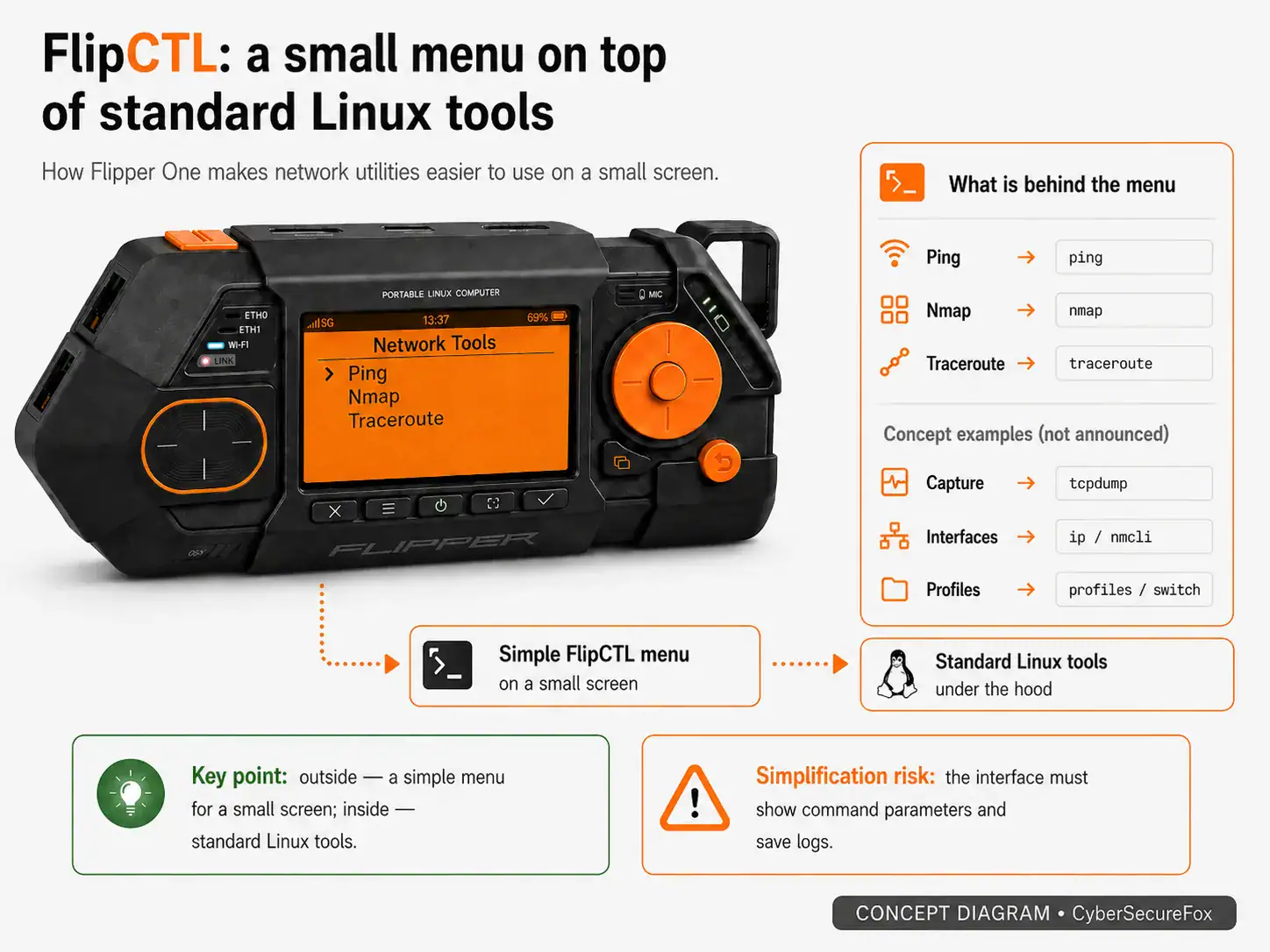
For professional use, there is a risk of oversimplification. The interface must not turn complex network actions into an opaque button press. It needs to show which command was run, which parameters were selected, where logs were written, and whether network traffic was generated.
Local AI and desktop mode: what is planned and what does not work yet
The RK3576 contains an onboard NPU, and the team plans to train a specialized LLM that understands the Flipper One hardware and helps users write configurations, troubleshoot networking tasks, and operate the device — all locally, without an internet connection. The idea is appealing for field scenarios where connectivity is unavailable but assistance is needed. However, the NPU is not yet supported in mainline Linux — this is a separate open task.
Desktop mode is another stated scenario: connect Flipper One to a monitor with a single USB-C cable via DisplayPort Alt Mode and get a usable desktop. The RK3576 delivers performance comparable to Raspberry Pi 5. But the team honestly lists current challenges: DP Alt Mode signal integrity is unstable, different monitors behave differently, hardware video decoding is not ready, and the choice of desktop environment is still under discussion.
These directions are best understood as what the documentation calls them: tasks that may be completed after the device ships. Purchasing decisions should be based on what works at the time of release, not on the roadmap.
Financial and technical risks
Flipper Devices deserves respect for its transparency, but several risks are worth stating explicitly. In the postscript to the original article, Pavel Zhovner specifically mentions financial risks, including the memory chip market crisis. For a device with 8 GB of RAM, this is not an abstract concern: memory cost and availability directly affect the economics of the future product. As early as February 2026, Zhovner publicly questioned whether the project could survive economically.
Flipper One’s target audience is considerably narrower than Flipper Zero’s. Flipper Zero sold over a million units and attracted a broad audience. Flipper One targets network engineers, security professionals, and advanced developers — a more demanding crowd that judges software quality, driver stability, and long-term support more strictly. Without a critical mass of users, the module ecosystem may not develop.
Finally, the project is trying to cover a very wide scope: network tool, open platform, modular system, small-screen interface, OS profiles, local AI, desktop mode, satellite connectivity, and open hardware development. Success will depend on which scenarios the team brings to a stable state first.
Defensive perspective: how organizations should approach devices like this
Any portable network node — a laptop, mini PC, router, or phone in tethering mode — can simultaneously be a useful tool and a risk at the trust boundary. Defense should be procedural, not built around banning a single brand:
- Document connection authorization. Test devices must have an identified owner, purpose, network segment, testing window, and responsible contact.
- Monitor for new network indicators. New MAC addresses, DHCP leases, bridges, access points, unusual DNS queries, and traffic mirroring should all feed into monitoring.
- Manage artifacts. Pcap files, logs, VPN keys, profiles, and temporary configurations must be stored and deleted according to policy — not left on the device after a project ends.
For lab examples and documentation, use addresses from the ranges reserved in RFC 5737: 192.0.2.0/24, 198.51.100.0/24, and 203.0.113.0/24.
How to join the development
The contribution page divides the project into seven tracks: hardware (PCB, antennas), mechanics (enclosure, buttons), Linux (kernel, drivers, bootloader), MCU firmware (RP2350), user interface, documentation, and testing. The open tasks list flags specific areas where help is needed — from Wi-Fi chipset testing to USB DP Alt Mode and power management work.
Contributing is not limited to code. The team is looking for people who can test networking scenarios, review and improve documentation, provide feedback on module mechanics, help with upstream kernel tasks, or bring experience from similar projects. Flipper Devices is also hiring a Developer Portal manager to serve as a bridge between the development team and the community. Project updates are published at @Flipper_RND.
Frequently asked questions
Can I buy Flipper One yet? No. Prototypes exist, but the price, shipping date, and final configuration have not been announced.
Does Flipper One replace Flipper Zero? No. These are different categories of device. Zero handles offline protocols and physical access. One is a Linux platform for IP networking, routing, and compute-intensive tasks.
What OS will Flipper One run? The target system is Flipper OS, a Debian-based layer with a profile system, but its architecture is still being designed. The kernel is mainline Linux with support for booting directly from kernel.org. The specific desktop environment is still under discussion.
Can I run Kali Linux or another distro? Running other distributions is potentially possible thanks to the mainline kernel approach, but the target system remains Flipper OS, whose architecture is still being designed.
What is the biggest risk? Scope. A single device is trying to be a network tool, an open platform, a modular system, a custom OS with profiles, a local AI endpoint, and an open hardware project. The team recognizes this and is asking for help accordingly.
Resources and related materials
Start with the original post Flipper One — we need your help, then explore the Developer Portal. Key documentation sections: technical specifications, use cases, RK3576 mainline status, Flipper OS concept, FlipCTL concept, network tests, and the M.2 port specification. Context on Collabora’s work with RK3576 is in their blog post.
For safe use of dual-use tools, refer to NIST SP 800-115 for test planning and the OWASP Web Security Testing Guide for web scenarios. For evaluating product maturity, the CISA Secure by Design principles provide a useful framework.
Related CyberSecureFox articles: early Flipper One breakdown, Flipper Zero guide, building a safe pentest lab, and organizing a penetration testing workspace.
Next steps
Do not start with “should I buy Flipper One” — that question is premature. Instead, figure out which role fits you in this project. If you work in wireless security auditing, test the MT7921AUN chipset against your scenarios and share results through the network testing page. If you work on Linux kernel development, check the open tasks for power management, USB DP Alt Mode, and NPU. If you design hardware modules, download the enclosure 3D models and evaluate the mounting mechanics. If you need a stable tool for regulated work, wait for mature builds, independent tests, and final specifications. Subscribe to the Developer Portal weekly digest to track progress across all workstreams.